


2nd Line - Second Phone Number
4.35.39K Reviews
App Specs
- Version
- 2.6.1
- Updated On
- License
- Free
- Downloads
- 10,000,000+
- Developer
- Dingtone Communications Ltd
- Categories
- Communication
- Platform
- Android
Screenshots
 Analysis by AppCompare
I find a second number most useful when it solves a specific problem: keeping work calls apart from personal ones, managing a temporary project, or avoiding handing out my everyday number to every contact. 2nd Line - Second Phone Number is built for that kind of separation, putting calling and texting on a second line in an app rather than requiring another handset. It is a communication app from Dingtone Communications Ltd, and its focus is practical: get a number, then use it to contact people or receive verification messages.
That convenience does come with a distinction worth keeping in mind. An app-based number is not identical to a second mobile plan or a separate physical SIM. If you need a line tied to a particular carrier, dependable access in every situation, or a number that every service will accept for verification, a traditional mobile line may suit you better. I would treat this app as a useful extra channel, not as a guaranteed substitute for a primary number.
Getting Started with 2nd Line
Setting up 2nd Line was a breeze. The app is available on both Android and iOS, so you’re covered regardless of your device preference. After downloading, you’re prompted to create an account. It’s pretty straightforward, and you’re up and running in no time.
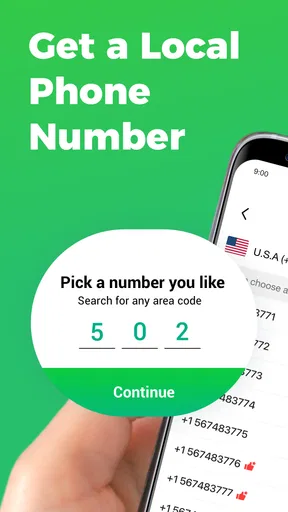
Once logged in, you can choose your new phone number. The selection process is surprisingly vast, offering a varied range of area codes. This is particularly handy if you need a local number for a specific region. I picked one from a different city, just to feel a bit more cosmopolitan.
Features that Stand Out
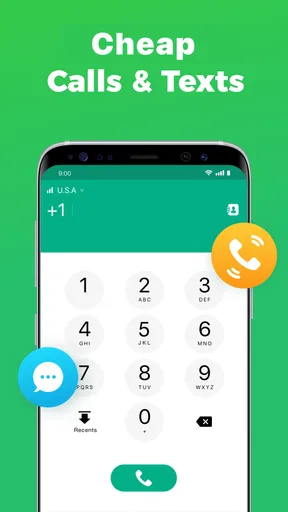
So, what can 2nd Line actually do? Well, for starters, it offers unlimited calls and texts within the US and Canada, which is a huge plus if you’re frequently communicating with friends or clients across the border.
One of the features I found particularly useful was the ability to customize voicemail greetings. It feels personal and helps in maintaining a professional touch if you’re using the number for business.
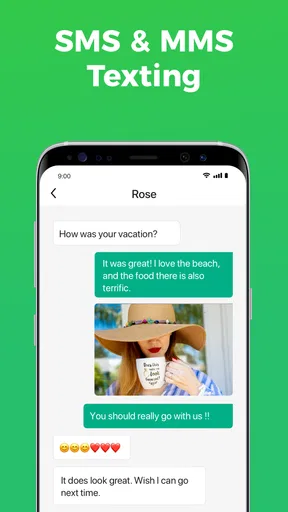
Also, the app supports MMS, so you’re not restricted to just text-based communication. Send photos, emojis, and even videos without a hitch. The interface is intuitive, making it easy to navigate between messages and calls.
Privacy and Security
In today’s digital age, privacy is paramount. I was relieved to see that 2nd Line takes security seriously. The app allows you to lock it with a passcode, adding an extra layer of protection for your conversations.
Worth Reading Before You Choose

Flipboard Shows What News Apps Must Do Beyond the Feed

Switching to Android Auto Means Rethinking Your Driving Routine

Google Calendar Makes a Crowded Week Easier to Manage

Ludo King Makes the Most of the Minutes Between Plans

Baby Panda World Brings Quick Play to Modern Phones, but Its Game Library Feels Busy

ESPN’s Live Game View Makes Following Close Games Easier
Moreover, the app doesn’t link your real number to your second line, so you can maintain anonymity when needed. This is perfect for online transactions or any scenario where you’d prefer not to share your personal number.
Usability and Performance
Performance-wise, the app is solid. I didn’t experience any lag during calls or while texting, which is essential for maintaining a seamless communication flow. The call quality was clear, rivaling that of my primary number.
You can also use Wi-Fi calling, meaning you’re not tethered to your cell service. It’s a lifesaver in areas with spotty cellular coverage but decent Wi-Fi.
Integration and Compatibility
The app integrates well with your existing contact list, making it easy to reach out without the need for manual entry. It’s compatible with most devices, and I didn’t run into any issues on either Android or iOS.
One small gripe, though, is that the app could do with a bit more polish in terms of design. It’s functional, but a modern facelift wouldn’t hurt.
Choosing the Right Role for a Second Line
The strongest use case, in my view, is keeping a boundary between groups of people rather than trying to make the app handle every kind of communication. A freelancer can give clients the app number, then keep family and close friends on the regular line. Someone selling furniture online can use it for replies and calls about a listing, without putting their personal number in a public post. A traveler arranging local plans may also find a separate contact channel useful, provided they check that the number works for the services and people they need to reach.
A realistic routine might look like this: I post an item for sale, use the second number for interested buyers, and let calls and messages about the transaction stay in one place. When the sale is over, I can stop sharing that number in new listings. That does not erase information already seen or saved by other people, so I would still avoid sending sensitive details and would not treat a second number as complete anonymity.
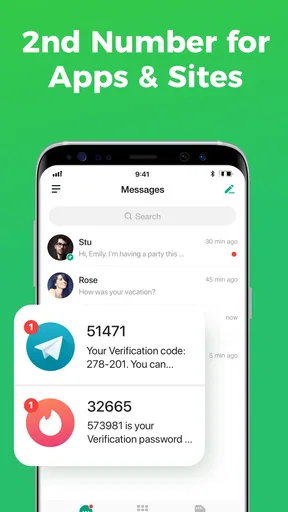
For verification, the main benefit is having another number to try when a service asks for one. The important trade-off is that acceptance depends on the service doing the verification. If a bank, workplace, or account provider requires a number registered directly to a mobile carrier, an app-based line may not meet that requirement. I would keep my primary number available for essential accounts and use this one for lower-stakes sign-ups or separation, rather than making it the only recovery route for something important.
Where Setup and Verification Can Get Stuck
If a code does not arrive, I would first check the number entered, the country or region expected by the service, and whether the verification screen offers a text or voice-call option. Then I would confirm that the second-line app is open and that the device has a working internet connection. Repeatedly requesting codes in quick succession can make it harder to tell which message is current, so I prefer to wait for the service’s next available attempt rather than sending a string of requests.
Choosing an area code is not just a cosmetic decision. A number that looks local can feel more familiar to people you contact, but it does not necessarily mean you are physically in that area or that a recipient will answer an unfamiliar call. For a business side line, I would pick a number that makes sense for the people I expect to reach, then use a clear voicemail greeting that explains who I am and why I might be calling. That small step can make an app-based line feel less like an unknown caller.
The app is free to install, though it includes in-app purchases ranging from $0.99 to $89.99 per item. I would check the current options inside the app before building a routine around it, especially if I expect frequent calls or texts. The free starting point is appealing, but the presence of purchases means “free” should not be read as a promise that every level of ongoing use will cost nothing.
Recovering a Useful Workflow
When a call or text seems to go missing, I find it helpful to separate the possible causes instead of assuming the number has stopped working. Check whether the same contact can reach you by a different method, whether the issue affects calls as well as messages, and whether the device is online. If only one person’s messages are affected, the problem may be on their side or related to how they are contacting the number, rather than a general app failure.
For important conversations, I would not rely on memory alone. Save the contact with a note that identifies it as the second line, and tell regular callers which number to use. This reduces the common mix-up where someone replies to the personal number after receiving a message from the app number. If I use the line for client work, I would also keep a separate record of pending conversations outside the message thread, so a missed notification does not become a missed commitment.
Switching between a personal line and an app line also asks for a little discipline. Before calling back, check which number the recipient saw and which line is selected in the app. Returning a business call from a personal number can undo the separation you set up in the first place. A consistent habit—handling those replies from inside the second-line app—does more for privacy and organization than simply installing it.
When the App Is Not the Cause
Not every failed call points to a fault in the app. The person you are calling may have poor reception, may have silenced unknown callers, or may simply be unavailable. A text can also go unanswered because the recipient does not recognize the number. I would leave a concise voicemail or send a brief message identifying myself, rather than making repeated calls that could look like spam.
Wi-Fi calling can help when cellular coverage is weak, but it still depends on a usable internet connection. If a call breaks up, I would try moving closer to the router or switching to a steadier connection before judging the line itself. Conversely, a strong Wi-Fi signal does not guarantee that the other person’s service is equally good. Testing with a trusted contact helps distinguish a local connection problem from an issue with one particular recipient.
Privacy has similar limits. A separate number helps keep your everyday number out of a conversation, but it does not make messages or calls untraceable, and it does not protect information you choose to share. I would avoid using it to impersonate someone, evade accountability, or send sensitive personal data. Its sensible role is separation and convenience, not invisibility.
How It Compares With a SIM or a Messaging App
Compared with adding a second SIM or paying for a separate mobile line, an app is easier to try because it keeps the extra number on the device you already carry. That makes it attractive for short-term projects and casual separation. A dedicated carrier line is usually the more suitable choice when you need a number to behave like a conventional mobile subscription or want fewer uncertainties around account verification and availability.
Compared with messaging through a social or chat app, a second phone number is useful when the other person expects to call or text a number rather than add a username or join a particular platform. The trade-off is that people still need to recognize the number and you need to keep the app available for that channel. I would choose a chat service for an established group that already uses it, and the second line for contacts who need ordinary phone-style communication.
There is also a practical question of continuity: if this number is tied to an account or a paid use pattern, do not assume it should be the permanent home for every important contact. Keep critical services tied to a dependable primary number, and review which people or accounts still need the second line. That makes it easier to change your communication setup without losing track of where verification codes or essential calls are expected.
Final Thoughts
All in all, 2nd Line - Second Phone Number delivers on its promise of providing a reliable secondary line without the hassle. Whether you need it for business, personal use, or just to keep things separate, it’s a versatile tool that fits the bill.
If you’re in the market for a second phone number, this app is definitely worth checking out. It’s user-friendly, cost-effective, and most importantly, gets the job done without any fuss.
Ready to give it a shot? You can download the app from the App Store or Google Play. Happy texting!
There is a solid audience for this kind of tool: people who want a separate contact point but do not want to carry a second handset. Its 4.3 average from around 48,000 ratings, alongside over 10 million installs, suggests that many people have found a use for it. It is rated for Everyone, and version 2.6.1 supports devices running Android 7.0 or later. Those details make it easy to assess basic fit, but I would still think about how central the number will be to my life before moving important accounts over.
My practical verdict is that the app is best when the second line has a clear job: screening marketplace inquiries, receiving noncritical verification texts, or keeping a modest client list separate. It is less compelling if you want one number to serve as a permanent, universally accepted identity across banks, work systems, and personal accounts. I would start with a low-stakes use, learn how reliably the people and services I care about interact with it, and only then decide whether it deserves a bigger role in my routine.
Pros
- Offers a separate phone number for privacy.
- Easy setup and intuitive user interface.
- Affordable pricing plans available.
- Supports text and voice communication.
- Works on both Wi-Fi and mobile data.
Cons
- May experience occasional call drops.
- Limited features on the free version.
- Ads can be intrusive at times.
- Requires internet connection to operate.
- Some users report delayed notifications.
FAQs for 2nd Line - Second Phone Number
What is 2nd Line - Second Phone Number?
2nd Line - Second Phone Number is an app that provides users with a second phone number for their mobile device. This can be used for business, privacy, or any situation where separating your phone numbers is beneficial. It offers features like call forwarding, voicemail, and text messaging.
Is 2nd Line available for both Android and iOS devices?
Yes, 2nd Line - Second Phone Number is available for download on both Android and iOS platforms. Users can find the app on the Google Play Store for Android devices and the Apple App Store for iOS devices, ensuring broad accessibility across different operating systems.
What are the primary benefits of using 2nd Line?
The primary benefits of using 2nd Line include maintaining privacy with a separate number, managing personal and business communications on one device, and avoiding the need for an additional phone. It is also cost-effective compared to traditional phone plans, making it a convenient option for many users.
Are there any limitations or drawbacks to using 2nd Line?
While 2nd Line offers many advantages, some users might experience limitations like occasional connectivity issues or limited international calling options. Additionally, the app might offer in-app purchases or subscriptions for premium features, which could be a consideration for budget-conscious users.
How secure is the 2nd Line app for protecting my personal information?
2nd Line takes user privacy seriously, implementing various security measures to protect personal information. However, as with any app that handles sensitive data, users should ensure they understand the app's privacy policy and take personal steps, such as using strong passwords, to enhance their security.


